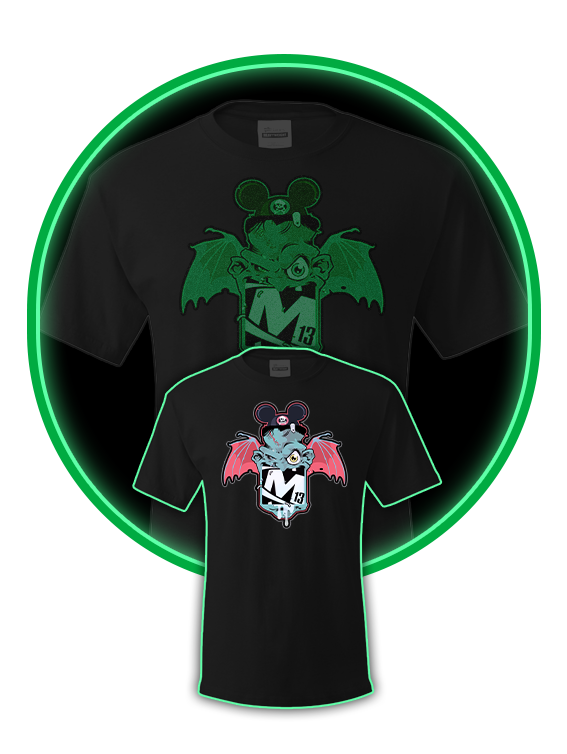
Stand out in the crowd with custom glow-in-the-dark t-shirts. Whether for a concert, festival, school event, or promotional giveaway, these shirts are guaranteed to grab attention when the lights go down. Made from soft, comfortable fabric with high-quality luminous printing, they charge in light and glow brilliantly in the dark.
Not sure how to design for glow ink? Our apparel design specialists know exactly how to create graphics that look sharp in daylight and glow perfectly at night. We’ll craft your t-shirt artwork so your brand literally lights up the room.
Glow-in-the-dark DTF Film
We do tons of glow-in-the-dark t-shirt printing, and we have streamlined the process to make it as easy as possible. Just download the glow-in-the-dark t-shirt template for the size and application format you need, create your artwork, and upload your design to print.
If you are doing a custom size or do not see a template in the application you are using, please be sure to use the following specifications to design your glow-in-the-dark t-shirt.
To ensure the best print results on apparel and UV DTF products, follow these file setup guidelines when preparing your artwork:
Resolution: 300 dpi at final print size
Background: Must be transparent where you do not want white ink printed
Color Mode: CMYK preferred (RGB PNG accepted)
File Format: PDF preferred, high-resolution PNG with transparency accepted
• Do not include a white background unless you intentionally want white printed
• Any area that is not transparent may print white ink underneath
• RGB PNG files will be converted to CMYK and colors may shift slightly
• Some PNG exports reduce resolution - always confirm 300 dpi at final size
• Avoid extremely small text or thin lines that may not transfer cleanly to fabric
File > Export
Choose Adobe PDF (Print)
Select preset: Press Quality
Ensure background elements are removed where transparency is needed
Click Export
Remove background layer
Confirm transparent areas show as checkerboard
File > Save As
Choose Photoshop PDF or PNG (with transparency enabled)
Confirm 300 dpi resolution
Click Save
DTF printing applies white ink under color. If backgrounds are not properly removed, unwanted white boxes will print. Supplying clean, high-resolution artwork ensures vibrant color and sharp detail on your finished apparel. If you have any questions, give us a call at 877-613-1913 - we are here to help.
Using our glow-in-the-dark t-shirt template is simple. Just download the size and application format you need, create your artwork, and upload your design to print.
SIZE (W x H)
Photoshop
T-Shirt
Stand out in the crowd with custom glow-in-the-dark t-shirts. Whether for a concert, festival, school event, or promotional giveaway, these shirts are guaranteed to grab attention when the lights go down. Made from soft, comfortable fabric with high-quality luminous printing, they charge in light and glow brilliantly in the dark.
Not sure how to design for glow ink? Our apparel design specialists know exactly how to create graphics that look sharp in daylight and glow perfectly at night. We’ll craft your t-shirt artwork so your brand literally lights up the room.
Glow-in-the-dark DTF Film
Digital Proof
Economy T-Shirt
Press and Imprint Locations
Shrink Wrapping
We do tons of glow-in-the-dark t-shirt printing, and we have streamlined the process to make it as easy as possible. Just download the glow-in-the-dark t-shirt template for the size and application format you need, create your artwork, and upload your design to print.
If you are doing a custom size or do not see a template in the application you are using, please be sure to use the following specifications to design your glow-in-the-dark t-shirt.
To ensure the best print results on apparel and UV DTF products, follow these file setup guidelines when preparing your artwork:
Resolution: 300 dpi at final print size
Background: Must be transparent where you do not want white ink printed
Color Mode: CMYK preferred (RGB PNG accepted)
File Format: PDF preferred, high-resolution PNG with transparency accepted
• Do not include a white background unless you intentionally want white printed
• Any area that is not transparent may print white ink underneath
• RGB PNG files will be converted to CMYK and colors may shift slightly
• Some PNG exports reduce resolution - always confirm 300 dpi at final size
• Avoid extremely small text or thin lines that may not transfer cleanly to fabric
File > Export
Choose Adobe PDF (Print)
Select preset: Press Quality
Ensure background elements are removed where transparency is needed
Click Export
Remove background layer
Confirm transparent areas show as checkerboard
File > Save As
Choose Photoshop PDF or PNG (with transparency enabled)
Confirm 300 dpi resolution
Click Save
DTF printing applies white ink under color. If backgrounds are not properly removed, unwanted white boxes will print. Supplying clean, high-resolution artwork ensures vibrant color and sharp detail on your finished apparel. If you have any questions, give us a call at 877-613-1913 - we are here to help.
Using our glow-in-the-dark t-shirt template is simple. Just download the size and application format you need, create your artwork, and upload your design to print.
SIZE (W x H)
Photoshop
T-Shirt
Click the button below to view our locations and hours
Location and Hours© 2026, M13 Inc. All Rights Reserved.